

Release Notes v0.2.8507.5481: Last Chance and Memory Crash Fixes
It has yet again been too long since the last update. Saying that is kind of like in the 90s when bloggers would start every post with “It’s been too long since my last post!” Anyway, I swear this update was supposed to be out months ago, and not just in time to avoid the Steam Early Access Notice of Shame which posts after a year of no updates, which is like in a week and a half or something. The real reason this update is happening right now is I am crunching to get some stuff done for PAX West in three weeks and I needed to get all these pending changes out there so I can try to get a new thing in for the PAX booth (come say hi, booth 1500!), but that is looking increasingly unlikely since this update is way later than I thought it’d be. Yikes, anyway, indie game development, wheeee!
The big stuff, details are below:
- Last Chance Replay Sniper Mode
- Memory Crash Fixes
- MacOS Working Again on Wine
Last Chance Replay Sniper Mode
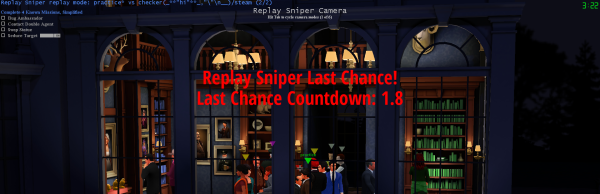
The biggest new gameplay feature is called Last Chance. It used to be called “Wodar’s Ending,” but like what the heck is a Wodar? Well, Wodar is a long-time SpyParty player and community member and discord moderator and friend. It is really great when your indie game community is so friendly you become real friends with the people in it. More reasons to come say hi in person at PAX West! And join the SpyParty discord! But I digress. Anyway, a very (very, very, very, very) long time ago I added Replay and Spectation Sniping to the game, which means you can play Sniper against either the Spy in a recorded replay of a previous game, or against the Spy in a live game happening in the lobby while you’re spectating a match. This is totally awesome, and worked out way better than I thought it would (there were some game design concerns about how much the lack of “laser feedback” to the OG Spy would matter, kinda deep subtle stuff like that, but it worked really well), and it was so great that I later (although still very long ago) added the Sniper Daily Challenge to the game, where the lobbyserver would query the giant database of past replays (no, really, it is giant, as of this writing there are 5,862,324 replays in the database at all skill levels and venues and game modes), and serve up 8 replays at 8 different skill levels every day, so folks could warm up for a live human match, or compete with other players for the best daily score, that sort of thing.
So, replay sniping is awesome, but if you think about it, there’s a problem with some game endings. The four normal game endings in SpyParty are Spy Missions Win, Sniper Shoots Civilian, Spy Timeout, and Sniper Shoots Spy. The first two are Spy wins, the second two are Sniper wins. Well, for a replay sniper game, Spy Missions Win and Spy Timeout let you play a full Sniper game against the original Spy. So, when the lobbyserver queries the replay database, it asks for replays with these endings most of the time. But, Sniper Shoots Spy is an interesting ending; you as the new replay Sniper can “race” the OG Sniper to see who shoots the Spy first. So that’s cool, and the lobbyserver generates Race the Sniper Daily Challenges every once in a while (the game tells you which type you’re playing because in Race modes you know you need to shoot or you’re going to lose to the OG Sniper). But, Sniper Shoots Civilian was not really that playable as a replay Sniper, because it’s kinda weird to race the original sniper when they’re wrong. And also, Sniper Shoots Spy was kind of not super exciting at the end, because the game just ends and says the original Sniper shot the Spy. We were talking about this in the spyparty.com forums (which was where the community gathered before discord took over the world, although I hope to revive them at some point), and Wodar had the idea of pausing the replay sniping game at the OG shot, and then giving the new Sniper some time to take a shot. This was just immmediately obviously the right game design, it just took years for me to actually implement it. And it is indeed pretty cool now that it’s in, even for Sniper Shoots Civilian. It is cool enough that I think after some testing I am going to make the Daily Challenge a Race the Sniper set happen every week.
The actual reason I finally got around to adding this recently is because I am preparing for No Wait Matchmaking, which in order to keep the queue instant and be truly No Wait, is going to feed live spectations of other matchmaking players to queuing players to snipe, and that means as the waiting Sniper, you’re going to need to have fun with all four game endings of the underlying game. You’re also going to need another replay sniping feature that I will do after PAX West, which is called Late to the Party, which means it will scrub through the live game until you’re caught up with the live players, so you’re in sync and everybody frees up into the matchmaking queue at the same time. I will talk about Late to the Party when it’s in, but I think it is even going to show you the missions the Spy has accomplished during the fastforward time to balance out all the information you missed.
To test out Last Chance for yourself, go into your Replays folder and look for Spy Shot and Civilian Shot games, and replay snipe those. Or go into the lobby and spectation snipe matches and those endings will come up naturally. Make sure you load up the replay of your Sniper game so you can see how much work I put into making the playback super solid, with rewinding and scrubbing and even if you have multiple replay Sniper shots enabled. It was a ton of work for something that seems pretty simple. It probably has bugs, so please report them if you find them!
Oh, in the match results screen from a replay or spectation sniping session, and in the discord Daily Challenge results post, any Last Chances shots will be denoted by italics.
Memory Crash Fixes
The game’s code has been relatively crash-bug free for years (famous last words), but there are two causes of crashes that are somewhat out of my control that happen pretty frequently for players: graphics display hooks like discord, steam, OBS, and those sorts of things crash the display driver a lot, sadly; and running out of memory especially on AMD graphics cards, or at high resolutions. I can’t do much about the former, these hooks are brittle, and especially so since SpyParty is written with OpenGL instead of Direct3D and so they get less testing with the OpenGL drivers. I will eventually make a Direct3D build of the game when I get the code truly platform portable, but that’s a ways away. But, for the latter type of crash–running out of memory–a big contributor is the current spyparty.exe executable installed by steam or the spyparty.com setup program is a 32 bit application. This was the norm when I started making SpyParty back in the 17th century, but eons have passed and 64 bit applications are the norm now. However, the game was crashing all the time on some AMD drivers, even with low textures and low resolution windows, and I think it was because AMD drivers were allocating more graphics stuff in the client’s memory than NVidia and Intel drivers were, and there is just not a lot of memory for a 32 bit application these days…but I am not sure about this. However, I finally got the game ported to 64 bits on Windows, and the spyparty64.exe is included in this update! But also, another SpyParty player, community member, discord moderator, and friend, bl00dw0lf, found there is a flag you can set on 32 bit executables called “large address aware” to allow them to use more address space (by default old applications are only given access to 2GB of address space instead of the full 4GB of 32 bit address space), and we tested this flag and it seems to fix the problems even on the 32 bit spyparty.exe! So that is also enabled in this update on spyarty.exe! So, if you were crashing, hopefully you won’t be now, even with the 32 bit executable, but if you are, you can also try the 64 bit executable, and I’ll explain how below. And, once the 64 bit executable has had some more testing, it will become the new default.
MacOS Working Again on Wine
Another great thing about finally having a 64 bit executable is now we run fast on Wine on MacOS again. Apple’s x86 translation helper, called Rosetta2, was really slow for 32 bit x86 code, but it translates 64 bit x86 code at full speed, so I’ve been running spyparty64.exe on my old m1 Macbook Air and even on that old hardware it is running at full framerates. If you are technical and know how to install Wine on MacOS, you can go ahead and start playing with spyparty64.exe at playable framerates! This fall I am going to finally package up SpyParty and Wine and put together a MacOS steam install, so if you’re not comfortable installing and running Wine yourself, just wait a bit longer and you’ll be able to play on Mac again soon! And hopefully I’ll do a native port to Mac before Apple removes Rosetta2 support, which they’re threatening to do in a year or two.
Enjoy, and let me know if there are bugs!
Chris
Details and misc fixes for v0.2.8507.5481:
- so many checkins for Last Chance
- so many checkins for porting to 64 bits
- large address aware 32 bit build
- new oom message, and crash so a crashdump is created by default instead of just exit
- testing out transparent loading splash window on wine, works now
- create correct sized splash window on steamdeck so logo isn’t scaled up
- screenshot is alt-z now
- better event timeslider hittesting
- add timer beeps volume setting
- don’t display AI Controlled after shot before results
- clear scope on replay change to interactive sniper view so doesn’t get stuck in scope
- don’t adjust for client latency on replay sniper packets so they match up to the game better
- add file modified time to replays menu details
- replays menu fixes on macos, also select replay note if exists when launching explorer with ctrl-o
- also select base replay if sniper is selected and explorer launched
- fix bug with clicking on timeslider thumb stepping by dt
- fixing sniper laser and light bugs, drop .sniper latency to 0
- fix animation pop(s) from not starting cycles at the right time
- add a /log str chat command to add a line to the log.gz and flush it for markers, and fix flush pipe
- rare server crash fix oops
- update steamworks api and dll usage to more modern versions
- prevent assert and hang by randomizing when adjusting practice spy handicapping and locked levels
- fix weird sorting with intermediate mode unlocked due to sniper wins requirement, just use the unlock array ordering
- twitch -> youtube work for the twitch vodpocalypse, there are now endless casts on the SpyParty youtube channel, if you haven’t watched one of the amazing community casts of the amazing community tournaments, I’ve embedded a recent one right here…
How to enable spyparty64.exe on steam:
If you are still running into out-of-memory errors, or you just want to help me test the 64 bit executable, here’s what you do to run it on steam.DON’T DO THIS ON STEAMDECK, the steamdeck gets confused by the multiple processes spawned and window layers, so just run the 32 bit executable on deck, it already works great! (Well, I need to fix some stuff with lobby chat and ui but the game itself works well.)
- in the steam client, go to SpyParty in your library
- click on the Manage gear for the game
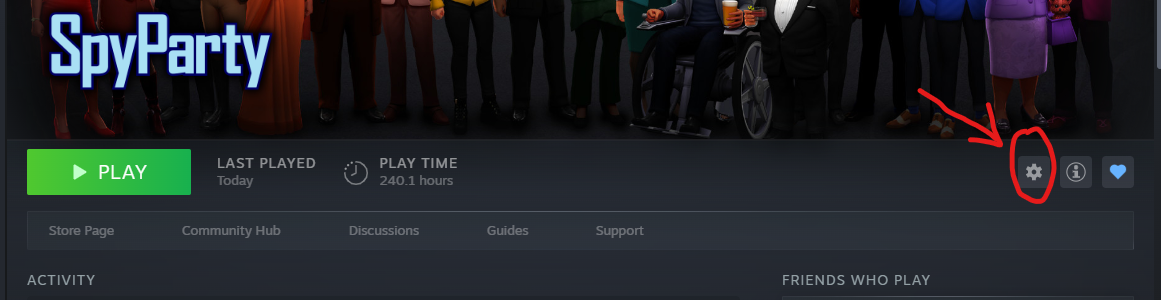
- hit Properties… in the popup menu
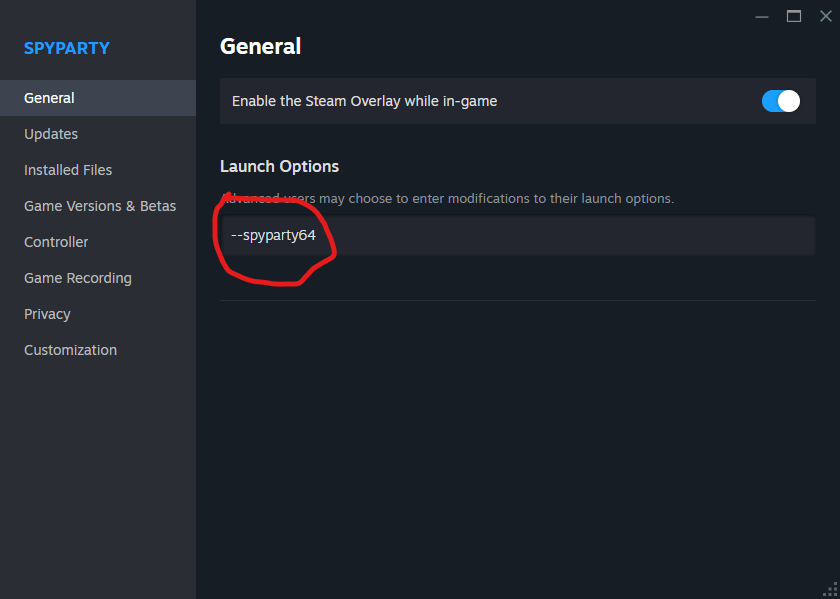
- make sure General is seleted on the left
- add “–spyparty64” to the Launch Options (two ascii dashes, no quotes)
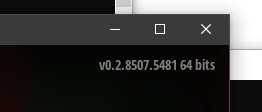
- close the Properties window and launch SpyParty, you should see it says “64 bits” in the upper right hand corner of the main game menu
- enjoy playing Redwoods at 5k with high texture quality or whatever you wanna do


